Desertcart purchases this item on your behalf and handles shipping, customs, and support to Norway.
🎧 Elevate your iOS audio game—capture every moment like a pro!
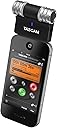
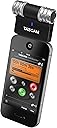
The TASCAM iM2 Channel Portable Digital Recorder transforms your iPhone, iPad, or iPod touch into a professional-grade stereo recorder. Featuring adjustable condenser microphones with a 125dB max input level, it captures loud concerts and instruments without distortion. Its built-in microphone preamp and analog-to-digital converter deliver low-noise, high-fidelity audio, all powered conveniently through the Apple dock connector for on-the-go recording excellence.
| ASIN | B006BLEZD0 |
| Antenna Location | Voice Recording, Video Recording |
| Audible Noise | 125 db |
| Audio Sensitivity | 125 db |
| Best Sellers Rank | #57,964 in Musical Instruments ( See Top 100 in Musical Instruments ) #101 in Portable Studio Recorders |
| Brand | Tascam |
| Built-In Media | battery, microphone |
| Color | black |
| Compatible Devices | Smartphone, Tablet |
| Connectivity Technology | USB |
| Connector Type | USB |
| Customer Reviews | 3.4 out of 5 stars 402 Reviews |
| Frequency Range | 20Hz 20kHz |
| Frequency Response | 16 KHz |
| Global Trade Identification Number | 07123123171075 |
| Hardware Platform | PC, Smartphone, Tablet |
| Impedance | 250 ohm |
| Item Dimensions | 3 x 1.5 x 4.75 inches |
| Item Weight | 2.56 ounces |
| Manufacturer | Tascam |
| Mfr Part Number | iM2 |
| Microphone Form Factor | Mini |
| Model Name | iM2 |
| Model Number | iM2 |
| Number of Channels | 2 |
| Number of Items | 1 |
| Polar Pattern | Unidirectional |
| Power Source | Battery Powered, Corded Electric |
| Recommended Uses For Product | Voice Recording, Video Recording |
| Signal-to-Noise Ratio | 125 db |
| Special Feature | While there are many apps that enable recording using an iPhone, iPod touch or iPad, Tascam's iM2 Stereo Microphone for Apple iOS Products provides you with an external pair of condenser microphones that plug into the dock connector of your chosen device. The iM2 has several recording features that make it easy to use and allow for superb audio recordings -- while its compact size means it can tag along pretty much anywhere you go. Special Feature While there are many apps that enable recording using an iPhone, iPod touch or iPad, Tascam's iM2 Stereo Microphone for Apple iOS Products provides you with an external pair of condenser microphones that plug into the dock connector of your chosen device. The iM2 has several recording features that make it easy to use and allow for superb audio recordings -- while its compact size means it can tag along pretty much anywhere you go. See more |
| UPC | 043774027798 |
| Unit Count | 1 Count |
| Warranty Description | Warranty on parts: 365 days; warranty on labor: 90 days. |
S**A
A great addition for your iPhone/iPad
I do my fair share of Garageband recording and have the mobile app as well. For my computer, I have a dedicated mic which suits my needs just fine, but for my mobile devices, their built-in microphones can be a bit disappointing at times. I ordered the TASCAM iM2 Stereo to fill in that gap between quality recordings in my mobile devices and so far I am very pleased with my purchase. It looks a tad bit flimsy (build quality) and one might feel that it could snap in half any moment, but it actually is a pretty sturdy little fellow. In any case, once you hear its recording quality and compare it with the default one, I am sure you will be smiling. Firstly, what I noticed in the sound quality was that apart from clarity, I could now "hear the room". To explain what I mean, the mic picks up the acoustics of the environment you are in and its actually cool to be able to hear what environment you are recording in. Also, the mic records in stere compared to the default mic which is in mono, so when you are listening to your recording via headphones, you will get a much more richer texture to your sound. I haven't been able to test out the limiter (its a switch on the side that you can turn on/off) but the next time I'm at a concert, I will definitely do it and will report back here. For now, I tried recording strumming my guitar as loud as i could as near to the mic as possible and the recording was smooth, no jarring etc. On the other side, there is a kind of a volume knob with 'level' printed next to it, but I haven't figured out what its for! Its definitely not the mic level because it records the same at both extremes. (Maybe mine is faulty?) Now they claim the mic is 180 degrees. I think they should have clarified that it is on hinges and can be panned MANUALLY around 180 degrees. There is a marking on the round cylinder like head and whichever direction the marking is facing, that means the mic is facing that direction. Lastly, I'd like to add that I carry this mic everywhere (i just slip it inside my jeans and forget about it) and I've already sat on it multiple times, dropped it, and thank god it hasn't broken yet. It doesn't feel all that big once in your pocket, and paired with the iPhone4s, which records in 1080p video, you have found it's soulmate. Please let me know if I've made any mistakes. Thanks for reading. Cheers. edit: I forgot to mention that since the mic takes the entire iPhone port, there is a mini USB port on the mic which facilitates charging of the iPhone. I wish it were MicroUSB since I have the plug, but I guess Mini USBs cables are not that hard to come by.
M**W
Deceiving
I bought this device for my iPhone 4 because I thought it would be handy to record myself with a better quality mic instead of the in-built mic and also record stuff on the fly. I tried it out the first day, and it seemed to work out alright. The quality is definitely better than the in-built mic, but the recordings with this device are generally softer, so you have to make sure that you're close to the mic. The recordings would also occasionally contain digital glitches and weird buffers even though I didn't touch the phone or mic, and there was no wind blowing. I thought it would eventually go away. Nope. This is the main reason I'm giving this product a one star. I just finished using this mic to record songs of me singing while playing the ukelele. But all four of my recordings had weird glitchy noises, and I have no idea why! I plug it in, the blue light turns on, I make sure that the red lines are facing the source of the sound, and I record, but the glitchy noises still happen, rendering my recordings useless. I read the reviews, and it didn't seem like this was happening to anyone else. I purchased a new one, but it doesn't sound new. I've tested the mic with various recording apps, and the glitches have occured with every app. There's the occasional recording that doesn't contain glitchy noises, but the iM2 is still unreliable. The only possible explanation I can think of is that this device doesn't work with iOS 7. So here's the breakdown of negative aspects you should take heed of: -the iM2 feels like light cheap plastic -while the iM2 is connected to your Apple device, you won't be able to listen to playback regardless of whether you're wearing earbuds/headphones -in response to those who have said that you can't record using the iM2 while earbuds (w/ a mic) are also plugged in: the phone/tablet uses the most recently plugged in device to record, so if you want to use the iM2 while wearing earbuds, you should FIRST plug in the earbuds THEN connect the iM2. But if you want to hear playback, you will still have to disconnect the iM2 every. single. time. It's annoying. -the iM2 does allow you to charge your phone while it's connected, but it needs a certain type of cable. I'm not sure what cable you need (sorry); I just know that you'll need something that is NOT your typical Apple or Android charging cable. -THE CABLE DOES NOT COME WITH THE PACKAGE!! -the iM2 doesn't use batteries; it thrives on your Apple device's battery. And there's no on/off switch. You will be constantly connectiing and disconnecting this device, AND IT'S SO ANNOOOYING. -weird glitchy noises will occur throughout your recordings. As far as the reason, I do not know. All I can say is that I am using an iPhone 4 w/ iOS 7. And these glitchy noises occur regardless of the recording app. It's major butt. The good: -it's portable. -without the weird glitchy noises, the audio quality is definitely better than the in-built mic because it removes a lot of white noise, and the sound is more balanced. The gain is pretty low, so unless you have a way to bump up the audio, make sure that you're close to the mic. I am very disappointed with this device. It's not what I wanted it to be. But to be honest, what can you expect from a mic that's 15 bucks? -_- Do what you want, you have been warned.
S**M
A Really Fun Accessory And Well Worth The Price
I am a musician as well as a big fan of live music in general. I've been trying to find a simple, portable way to get video recordings with quality audio. Typically, high volume levels in live music environments cause the built-in microphones on smartphones and camcorders to overload, clip the signal, and distort the sound. I've always liked the video functionality of my iPhone (short of the audio performance obviously) so I decided to give the Tascam iM2 a try. Here's what I've found out so far: -Physical Elements: The iM2 seems well constructed and as sturdy as you would expect from a little gadget like this. It's tiny, lightweight, and goes unnoticed in your pocket when detached from the phone. It should be understood that the mic should only be attached when in use. It is clearly not designed to be "installed". In fact, it will interfere with your iPhone's connectivity when attached. Just put it on when you're going to use it and save the wireless activity for afterwards. Also, the mic's jack connects confidently enough but understand that you will need to remove your case unless you have a thin or flexible one. I actually got a rubbery silicone case that can be pushed aside to accommodate the mic. The volume knob and limiter switch are teeny-tiny but functional. -App Compatibility: I have only tried a few apps with this device but every one of them has recognized and utilized the iM2 as the audio input. I have successfully used "Video Camera+", "Voice Memos", "Tascam's PCM Recorder", & "GarageBand". Tascam's app is a very simple audio recorder (similar to "Voice Memos") but works just fine. I read complaints about only being able to export to SoundCloud but this is not the case. All you have to do is use iTunes when your phone is connected and go to iPhone > Apps and scroll down to the bottom. You'll see your recordings right there under "Documents" when "PCM Recorder" is selected and they can be dragged over to your Library. I also heard about issues with live audio monitoring through headphones. You have to make sure you use headphones that are NOT equipped with an in-line mic. The iPhone will prioritize that microphone over the iM2 and won't send the audio out of the headphone jack. I use my Sony studio cans and have been allowed to live monitor in "PCM Recorder" as well as "GarageBand". -Audio Performance: I don't have to tell you that the sound quality is better than your device's built-in, miniscule, mono microphone. Of course a stereo condenser sounds better! It sounds a LOT better. You will receive a clear, crisp, and transparent signal feeding directly into your iPhone with no middleman. I've found myself having a lot of fun just repositioning it all over different rooms and hearing the differences. The crazy portability makes this experimentation a lot more feasible than dragging a mic, cable, interface, and laptop all over your house. I look forward to hearing people create fully produced songs with nothing but their phone and this mic! The challenge I did find however, with my application of recording live performances, was getting the input level correct. Because the video app has no level meter, I kind of had to guess and check results a lot because the signal certainly will clip if you have the iM2 turned up too much during a concert. I've found it easiest just to set the levels pretty low with the limiter on and end up with a low-volume audio track. Then I just put the file in iMovie and hit "normalize volume" under audio adjustments, for the whole video. This works great, just turns everything back up to where it should be in the file but with no distortion or clipping because I recorded at an appropriate level. I've now got a pretty easy way to record and process live performances with really good sound. There are a couple of features that I would really like to see on this device (maybe they'll show up on the iM3). This is one of the very first microphones of this type for iOS devices and I imagine they'll get better and better in the next few years. I agree with others who say a line-in would be a nice addition. More than that however, I would go 5 stars all the way if there was a level meter on the front. Even a single clipping light would help but a 3-segment, green-yellow-red, level meter would make it a nearly perfect product in my opinion. Overall, this is a really great audio accessory for your phone and a solid value at <$100.
D**D
Must own
To be honest I didn't expect a whole lot out of this considering it only costs 20 bucks, but I figured I'd give it a shot since it wouldn't be a huge loss even if it sucked. However, the iM2 completely exceeded my expectations and blew me away. I write a lot of downtempo and ambient music so I use this mostly to gather field recordings (water, footsteps, clanking, machine sounds, nature sounds, etc). This thing gives you very high quality, crisp recordings and extremely low to no noise. I also own a Zoom h4n which is nice but quite noisy and incredibly bulky compared with it. I almost never even bother with it now, the iM2 is way more convenient in terms of size and since I almost always keep my iphone with me anyway. I haven't used the Zoom for a while so my memory of it's sound quality is a little hazy, but honestly I think the iM2 sounds as good and maybe even better. I'm not sure how this would do if you were trying to record a band live or something like that which is dense with many layers, but this is definitely perfect for recording random sounds or voice stuff (a lecture or whatever). I can't comment on the tascam app because I've never used it (saw lots of people complain about it, but there is no reason you need to bother with it). I used this for a while with FiRe 2 and it worked perfectly. My phone got wiped after an OS update and now I use it with some free recording app (cant remember the name at the moment) and was worried that it wouldn't be compatible, but it works with no issues at all. Just plug in and hit record.
P**N
Returned product, second unit not so bad...
Updated review: (02Mar2013) I sent the original unit delivered (a white one) back for a return. A black one arrived in it's place, (kudos Amazon, you got a satisfied customer on that return)- which was what I actually ordered. This one works, and seems to work fairly well. Doesn't quite have the gain I would like, but it's definite a better, functional unit than the first one received. Overall sound quality is good to better than average. Far better than my mono iPad built in mic. Also a lot smaller than a full audio set up, and cheaper than a tascam handheld single purpose mp3 recorder. The software app (PCMRecorder) is okie, but files recorded are all .wav format. Bitrates for recording is variable, as are various limiter settings. You will need a pair of headphones in order to listen to the recordings, as the Im2 cuts out the iOS speaker when it is in the 30 pin slot. Let me repeat that, the speaker is disabled when the im2 is plugged in- even with the speaker button on. this is to eliminate sound squelch or feedback. The UV level meters on the app are very primitive bar level charts, so don't expect to do mixing on the fly with this app. Also the only way to get the recorded .wav files off the iPad is with soundcloud app. (Although it may be possible with the idevice plugged into a pc or mac?) That connection to soundcloud does work, but the software is a bit buggy, and you have to spend time to get it to work correctly. For my needs, this will work, and work well (freebie church recordings of the choral group, which will later reside on the church website.) There are other recording apps (most are $$$) for the iOS series, so I will be looking into those as well. So far, I found two that may work, and it does appear that the tascam im2 will port stereo sound into other apps as well. All in all, I am pleased I sent mine back to get another unit. But based on the reviews, I'd say that there is a high rate of failed units (33% or one in three?) that are incorrectly manufactured and DOA out of the box. I'm therefore going to move this from 1 star to three. Better, but not a five star product. I'd give it four, but the "buggy" nature of the iOS app and the first being a bad unit, causes that star to be lost. Also I am not sure tascam will bother to update the app, which is disappointing. It has a lot of potential, even if a so-so condenser mic set up. ---- (24Feb2013) Out of the box, I knew something was wrong. It was white, and I ordered black. Product is miserably made. Feels cheap, and the app does not work well. Half the time it will not even recognize the microphone. When it does, the recorder sets (not by default) to mono, rather than stereo. The limiters and the pickup are LOUSY! It's going back for a refund. This is a "P.O.S." Tascam, shame on you for such a bad product.
M**8
Terrible Device at any Price
I purchased this device as a way of using my old Iphone 4 as a recording device for spoken words, as well as audio, such as piano performances. Upon testing it for a few days, it became obvious that the microphone and accompanying app are so poorly designed that they are wholly unreliable. FIrst, the app. I read previous low reviews about the functionality of the app, so I downloaded it prior to receiving the hardware. It worked reasonably well using the built in Iphone mic. So, I thought, this set up might work after all. The humorous part is that the app works with the built-in mic, but it doesn't work at all with the im2 for which it was designed. I use the term "designed" freely here, because it's pretty obvious that it was cribbed together by a pack of monkeys. It wasn't easy to get the app to even agree to record anything, but when it finally did, and I played some piano, I found that the playback was completely non-functional. It played for one second, then paused, then played for another second, and so on. Even if you manage to get a recording, the app is so unreliable that you could never count on it when you need it. As for the unit, it's the cheap plastic that you would expect. The handling noise is unbelievable, and I am used to handling noise on my other higher end stand alone recorders. In fact, the handling noise is loud and clear, and that's about the only part that is. The audio that it captures is average at best. Also, the tiny plastic dial for the gain is impossible to use without disconnecting the entire unit as you attempt to scroll up and down. There is no on/off switch, so the unit is always on, always sucking the juice out of the phone battery. There is no headphone port, but since the mic didn't record anything of use, that turned out not to be a major problem. Finally, unlike the misleading ad, very few if any other apps work with the mic. They don't appear to recgonize that there is another app connected to the 30 pin port, and instead record using the built in mic. There is a reason that this mic is so inexpensive. It's horrendous. That's why.
M**E
Works best with other apps
The iM2 worked flawlessly the first time I plugged it in using FiRe 2 (by audiofile). Contrary to what many have said you /can/ listen to playback. Per the instructions, if you plugin your headphones (ones with NO microphone) /after/ you plugin the iM2, you can hit Play after the recording and listen to it just fine. A few issues. 1) Their free app is worthless, don't bother. Spend the extra few bucks and get FiRe 2 - Field Recorder. I have no relation to the company but their app is fantastic and works flawlessly with the iM2. 2) You can't listen through the headphones while you record. Not a huge deal. As noted, you can hit Play after and listen to what was just recorded. Getting the output files to your computer is listed as being a pain by some. That might be true using PCMRecorder but FiRe supports Dropbox so you can have them on your computer seconds after recording. As far as quality I've only done a few recordings but they are significantly better than the internal mic. I'm using an iPhone 4S.
M**T
Maybe it's my iphone, maybe it's the microphone but it doesn't work...
The recordings I get with this and my iphone4 have extraneous noises, squeeks, howls and grating. I don't know if it's the microphone or the iphone, but it is unusable. The software from TASCAM is also difficult to use and requires that you call support to get to play it back. This device was inexpensive, but basically useless. I purchased a "regular" digital recorder instead.
お**ん
お買い時
iPhone6sで問題なく使えています。 【並行輸入品】純正Lightning - 30ピン変換アダプタ(0.2 m) iPhone6 / iPhone6 Plus / iPhone5 / iPhone5s / iPhone5c / iPad mini / iPod touch5 / iPad / ipad air ios8 対応 という、安価品を購入して変換しておりますが今のところ問題有りません。 コストパフォーマンスがとても良いです。 音質も最高です。
W**T
Classic Recording
Having read the other reviews on this product I wasn't sure what to expect! I have to say that I am extremely pleased indeed. I am a professional musician in charge of the music in one of the ancient Cathedrals of England and it is always very useful to be able to actually hear what your choir sounds like from where the "audience" hear it. This Tascam product has captured the the choir of boys choristers and professional men singers and the cathedral organ, not forgetting the resonance of the Cathedral brilliantly. Wholeheartedly recommended.
A**.
An unfortunate waste of money
I was really excited to receive this product and test it out. It arrived promptly and in good condition. However, I find this microphone completely ineffective. I used it with my iPad 2 (having had to buy a new case that would allow the mic to fit) and tried it out a couple of times. There was no difference at all in the sound quality. In fact, in just using the iPad's own built-in microphone, I had slightly better results under the same conditions. I'm not sure why this didn't work, but if it were possible, I'd like to get my money back. So sad...
M**H
Tascam IM2 Microphone Noir
Tres bon micro qui se branche sur un iPhone. L'application par contre est lente et se biloque. Son utilisation est assez peu intuitive malgré les icones habituels que tout le monde comprend. Mais le son enregistré est tres bon et riche. Un tres bon micro.
G**O
Ottimo
Devo dire che sono rimasto sorpreso dalla qualità delle registrazioni. ottimo anche per registrazioni in sala prove. Il tutto sta nel trovare il pto giusto dove posizionarlo visto che la direzione in cui lo si punta è fondamentale. Molto utile anche poterlo collegare tramite micro usb per alimentare microfono e iphone. Amazon ovviamente sempre affidabile!
Trustpilot
2 days ago
2 weeks ago