Desertcart purchases this item on your behalf and handles shipping, customs, and support to Norway.
🖨️ Work Smart, Print Smarter — Your Office’s New MVP
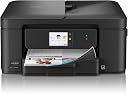
The Brother Work Smart 1410 is a compact, wireless color inkjet all-in-one printer designed for home and small offices. Featuring a 2.7” color touchscreen with cloud app integration, automatic duplex printing, a 150-sheet paper tray, and a 20-sheet automatic document feeder, it delivers fast print speeds of up to 16 ppm (black) and 9 ppm (color). Paired with the Brother Mobile Connect app and genuine LC501 ink, it ensures seamless mobile printing and reliable, vibrant output. Includes a 2-month free ink subscription trial for hassle-free ink replenishment.


| ASIN | B0FGC8KYP7 |
| Additional Printer Functions | Copy, Fax, Scan |
| B&W Pages per Minute | 16 pages_per_minute |
| Best Sellers Rank | #4,153 in Office Products ( See Top 100 in Office Products ) #26 in Inkjet Computer Printers |
| Brand | Brother |
| Built-In Media | Inkjet Cartridges |
| Color | Black |
| Color Pages per Minute | 9 pages_per_minute |
| Compatible Devices | Laptops, PC, Smartphones, Tablets |
| Connectivity Technology | USB, Wi-Fi |
| Control Method | App, Push Button, Touch |
| Customer Reviews | 4.0 out of 5 stars 278 Reviews |
| Display Type | LCD |
| Duplex | Automatic |
| Hardware Interface | USB 2.0 |
| Initial Page Print Time | Black: Approx. 6.2 seconds; Color: Approx. 9.6 seconds seconds |
| Ink Color | Black |
| Item Dimensions D x W x H | 13.5"D x 15.4"W x 7.2"H |
| Item Type Name | Brother MFC-J1410DW, Starter Black, Cyan, Magenta, Yellow Ink Cartridges, AC Power Cord |
| Item Weight | 16.8 pounds |
| Manufacturer | Brother |
| Maximum Copies Per Run | 99 |
| Maximum Copy Resolution Black and White | 1,200 x 1,200 dpi |
| Maximum Copy Resolution Color | 1,200 x 1,200 dpi |
| Maximum Copy Speed Black and White | 11 pages_per_minute |
| Maximum Media Size | 8.5 x 14 inch |
| Maximum Print Resolution Black and White | Windows: Up to 1,200 x 6,000 dpi; Mac: 1,200 x 3,600 dpi dots_per_inch |
| Maximum Sheet Capacity | 150 |
| Maximum print Resolution Color | Windows: Up to 1,200 x 6,000 dpi; Mac: 1,200 x 3,600 dpi dots_per_inch |
| Model Name | MFCJ1410DW |
| Model Number | MFCJ1410DW |
| Model Series | MFC-J |
| Number of Trays | 1 |
| Other Special Features of the Product | Auto Document Feeder, Auto-Duplex, Energy Star |
| Paper Size | up to 8.5 x 14 inches |
| Print media | Envelopes, Glossy photo paper, Paper (plain) |
| Printer Connectivity Type | USB, Wi-Fi |
| Printer Output Type | Color |
| Printer Type | Inkjet |
| Printing Technology | Inkjet |
| Resolution | 1,200 x 6,000 dpi |
| Scanner Type | Flatbed, Sheetfed |
| Special Feature | Auto Document Feeder , Auto-Duplex , Energy Star |
| Specific Uses For Product | Home |
| Total Usb Ports | 1 |
| UPC | 012502679738 |
| Warranty Description | 1-Year Limited |
| Warranty Type | Limited |
B**N
Perfect Printer so far for printing and scanning
This product arrived in perfect condition. It was easy to install it with my laptop and install the Brother software. Works flawlessly so far. Scanning is way better than with my previous HP printer that it replaced. Printing is faster also. Even the connection through our Wi-Fi is better. My wife can print from her phone easily again. Our previous HP printer did not do this well and had long delays when trying to scan or print. The Brother software is also way better. I like the fact it can auto-feed and has an easy-to-use color touchscreen. Can highly recommend this and also would purchase again. I was finally able to find a printer that does everything well. Hope it lasts for years.
A**R
Great printer for home use.
Package delivered with care and on time. Easy installed with app and my computer in 10 minutes because WiFi is a little slow. Printer working great, great value. This is a nice printer for home use, print documents in seconds and color is fast too. Ink came with purchase, easy to install. Make sure you have setting configure correct on your computer. On your apple iphone just follow the directions. Gosh, it’s easy, great printer for home.
V**D
RETURN IT, Another printer I either return or physically Smash it
My most recent printer was the Canon MegaTank G3270, which printed exceptionally well and was fantastic on ink. However, Canon’s Wi-Fi connectivity was a nightmare. Every time my house lost power, the printer lost its drivers, forcing me to reinstall their awful software all over again. Brother Work Dumb 1410 Printer: I'm RETURNING THIS! I found out that BROTHER IS INCAPABLE OF PRINTING DOCUMENTS OR IMAGES FROM ADOBE PHOTOSHOP ELEMENTS. The last 20 years or so I've been printing from Photoshop elements. Adobe Photoshop Elements is incapable of cleanly printing to the Brother Work Smart 1410 Wireless Color Inkjet All-in-One Printer due to a fundamental driver mismatch: the printer relies on generic Windows IPP / WIA class drivers by default rather than a specialized PostScript or robust raster photo RIP. When you trigger a complex image render from Photoshop Elements, these generic Windows wrappers frequently fail to handle color profile handshakes (ICC profiles), causing print jobs to stall, throw communication timeouts, or crash directly out of the software's print dialog. Called Brother Tech Support and they CONFIRMED IT. Also in addition to Adobe, any other program this message pops up before I start doing anything. ""Waiting for printer Connection... Please wait for printer connection or cancel connection."" Another Piece of CR%P Printer. DOES ANYONE MAKE A DECENT PRINTER ANY MORE? OR DO I NEED TO PURCHASE SOMETHING OVER $10,000?
K**T
Excellent little printer
Okay, overall this is an awesome little printer/copier/scanner. I got the black version and it looks much nicer than the white in my opinion. It seems well made and I expect it will be quite durable. I have had no issues with the paper jamming and LOVE that the paper tray drawer is accessible in the front of the machine. So far the ink is doing well-does not seem to gobble it up which is great. The print is clear, easily readable, and the colors very vivid. My only complaint regarding it is that it was not that easy to get going. I need my printer wired to my computer for various reasons with my work, and while it may be a snap to set up for wifi/phone, it was a pain the in the backside to hook it up via USB-had trouble using the PC app and had to uninstall/reinstall it several times before it seemed to work properly. It didn't immediately alert me that the drivers for the printer needed updating either-only after I started using it. All that being said...now that it is up and running...it is smooth, efficient, relatively quiet and does it's job very well...far better than any hp piece of garbage I have had to contend with in the past. Ink cartridges are easy to install too. I would recommend this product absolutely-just know if you are using the usb connection instead of wifi it may take a hot minute.
C**)
Buy one it pays off
I ordered two differnt printers before this one and had to return due to set up so I got this one and let me tell you this was the easiest one to ever set up along with the quality of the copies , unreal and only need to buy ink and nit often . Just overall the best printer there is .
J**7
Great for infrequent printing!
Nice printer. Test page isn’t an ink hog so you can print a test page periodically to exercise all the ink jets. Easy to set up and very quiet. Prints, copies and scans like a champ. Does double sided copying and printing too.
O**A
Excellent printer and it’s great on ink.
Love the printer. Ink lasts a long time and it fits all my needs. It even pushed me into the next century because it doesn’t fax which is what I always had with my machines. Now I fax with my phone or directly from the computer. Live it.
L**S
pros and cons does NOT FAX
Pros: much smaller and lighter than my last printer fast printing good quality printing Cons: ease of set up not great copying, ridiculously slow trying to read/use the screen which is the size of a postage stamp ink is ridiculously expensive NOT all-in-one. Doesn't fax, which I didn't notice right away, unfortunately. Should not be advertised as all-in-one.
S**A
Meilleure imprimante, marque fiable!
J'ai détesté mon ancienne imprimante... J'ai hésité longtemps avant d'en acheter une autre car je ne connaissais personne qui avait une imprimante qui fonctionne bien. Comme j'en ai besoin... J'ai fait plusieurs recherches pour en trouver une de qualité et c'est celle-ci qui est ressorti du lot. Je l'ai depuis plusieurs mois et je l'adore. Le papier ne bourre pas. Elle fonctionne très bien par wifi. Elle n'est pas compliqué à configurer. Pour l'instant je n'ai pas de point négatif à lui attribuer. Bref, je recommande!!
J**H
Works great!
Works great. It was a breeze to set up and get all of our devices linked to it for easy printing. Nice vivid copies. Everything you want and expect in a printer.
R**B
Please Retract This Review: after 7 hours later the printer seems to be working well. Thank you
I am so sorry I bought this printer, my 10 year old HP got taken out by a lightning storm as did the tv etc.. I did a review of the Brother printer and on line it looked amazing. Well it's not, hours to down load drivers for a new printer, difficult to set up with both a desktop and laptop, not plug and play at all. The quality is cheap, the screen interface is questionable at best. It's a Google relationship so be prepared to sign your identity away to make it work. I did get it working but the only thing good I can say about it is that the ink dry's well.
H**T
Mistakes happen.
Brother Printer works great and easy to install, when doing the print test yellow ink was empty.Bought new ink and things are working . I guess the ink was missed. Hart
P**.
Excellent choice.
Great printer.
Trustpilot
1 week ago
5 days ago