๐ Power your professional edge with Dell Optiplex 7010 โ where speed meets sophistication.
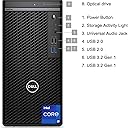
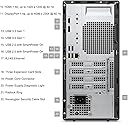
The Dell Optiplex 7010 Tower is a powerhouse business desktop featuring a 16-core Intel i9-12900K processor clocking up to 5.2GHz, paired with 64GB DDR4 RAM and a 2TB PCIe M.2 SSD for ultra-fast performance. Equipped with comprehensive connectivity options including USB 3.2, DisplayPort, HDMI, Wi-Fi, and Bluetooth, it runs Windows 11 Pro to deliver a secure, efficient, and future-ready computing experience tailored for demanding professional environments.
| ASIN | B0DQR1YLSH |
| Aspect Ratio | 16:9 |
| Best Sellers Rank | #21,961 in Computers & Accessories ( See Top 100 in Computers & Accessories ) #699 in Tower Computers |
| Brand | Dell |
| Built-In Media | Keyboard, Mouse |
| CPU Model | Intel Core i9 |
| CPU Model Number | Intel Core i9-12900K |
| CPU Model Speed Maximum | 5.2 GHz |
| CPU Speed | 3.2 GHz |
| Cache Memory Installed Size | 30 |
| Cache Size | 30 |
| Color | Black |
| Compatible Devices | Keyboard, Mouse |
| Connectivity Technology | Ethernet, HDMI, Wi-Fi |
| Cooling Method | Air |
| Customer Reviews | 4.3 out of 5 stars 152 Reviews |
| Display Resolution Maximum | 3840x2160 |
| Display Type | External |
| Graphics Card Description | Integrated |
| Graphics Card Interface | PCI Express |
| Graphics Card Ram | 1 GB |
| Graphics Coprocessor | Integrated Graphics |
| Graphics Description | Integrated |
| Graphics Ram Type | DDR4 SDRAM |
| Hard Disk Description | SSD |
| Hard Disk Interface | USB 2.0/3.0 |
| Hardware Interface | Bluetooth, DisplayPort, HDMI |
| Human-Interface Input | Keyboard |
| Item Dimensions | 11.7 x 6.1 x 12.8 inches |
| Keyboard Description | Wired USB Keyboard |
| Keyboard Layout | QWERTY |
| Manufacturer | Dell Computers |
| Memory Clock Speed | 3200 MHz |
| Memory Slots Available | 2 |
| Memory Speed | 3200 MHz |
| Memory Storage Capacity | 64 GB |
| Model Name | Business |
| Model Number | 7010T |
| Model Year | 2024 |
| Native Resolution | 3840 x 2160 |
| Number of Component Outputs | 2 |
| Operating System | Windows 11 Pro |
| Optical Storage Device | DVD-RW |
| Personal Computer Design Type | Computer Tower |
| Power Consumption | 180 watts |
| Power Plug Type | Type A - 2 pin (North American) |
| Processor Brand | Intel |
| Processor Count | 16 |
| Processor Series | Intel Core i9 |
| Processor Socket | LGA 1700 |
| Processor Speed | 3.2 GHz |
| RAM Memory Installed | 64 GB |
| RAM Memory Technology | DDR4 |
| RAM Type | DDR4 SDRAM |
| Ram Memory Maximum Size | 64 GB |
| Resolution | 3840 x 2160 |
| Security Features | Windows Defender, Windows Hello, BitLocker |
| Speaker Type | External Speakers Required |
| Specific Uses For Product | Business |
| Specification Met | True |
| Style Name | 64GB RAM | 2TB SSD |
| Total Expansion Slots Quantity | 2 |
| Total Number of HDMI Ports | 1 |
| Total Usb Ports | 8 |
| Unit Count | 1 Count |
| Video Output | HDMI, DisplayPort |
| Video Output Interface | DisplayPort, HDMI |
| Video Processor | Intel |
| Warranty Description | 1 Year Manufacture |
| Wireless Compability | 802.11ac |
| Wireless Network Technology | Wi-Fi |
| Wireless Technology | Wi-Fi |
T**T
Good price, should keep my hubby happy for his low-tech computer use
Fits the bill. I bought this for my tech-challenged hubby who doesn't do a whole lot of ram-sucking, storage-grabbing, and speed-needy computing. I wanted the bluetooth, wireless feature on this model. My son install an SSD internal drive. There's no slot for the drive to fit into, so it's sort of hanging from it's plug in on the motherboard. But, it's fine. the computer found it and none of the data was lost on that drive. For the price, it was a great buy for this level of use and has enough oomph to keep up with tech's inevitable growth and expansion over the next decade or so. One hopes.
D**R
Amazingly Light in Weight
First week, so this is first impressions. Lots of amazing surprises. First thing is how light it is. Second is how quiet it is. This is the first computer I've ever bought out of the box. I've always built mine myself. The tower is more of a medium to micro size. I wanted to add an additional drive and when I checked the FAQ's they said it could be done. They certainly have the wires for it inside, but no space or bracket for it. I made it work but was a little disappointed. Windows 11 so fare gets mixed feelings, but that's a different topic. Overall, very pleased with the computer.
T**L
worth the price
Cannot beat it for the price I added a better video and another 2tb SSD and there is a place to mount the second hard drive as I saw that someone said there wasn't, it is very quiet and boots up very fast and the wi-fi works well not to mention 3.2 USB slots on the front and back the only complaint is there is no sound jack in the back it is on the front panel only, so I added a sound card as well.
T**M
Dell knocks it out of the park with this computer
Pay the money now for a computer that will last you for many years. Paired with the Dell UltraSharp U2414H LED LCD Monitor and the Dell wireless keyboard and mouse, this will server well. Here's where I go a little crazy and attempt to install a 500 GB SSD boot drive. This was a two day event for me since I can only spend a few hours each evening after work to tackle this. Stuff you will need; Samsung 840 EVO 500 GB SSD (Don't forget to get the upgrade to the SSD driver from Samsung after this install) Silverstone Tek 3.5-Inch to 2 X 2.5-Inch Hard Drive HDD SSD Bay Converter, Monoprice 18-Inch SATA III 6.0 Gbps Cable with Locking Latch and 1 x 90-Degree Plug and Paragon Drive Copy 14 Professional to copy the HDD to the SSD. WOW! InDesign CS5 (big program) opens in 2 seconds. This used to take half of my lunch break to load on my old steam powered 5 year old computer. So now I use the 2 terra byte HDD as storage drive. A quick word about Windows 8.1. Get over it! Once you understand that this OS is trying to be an app launcher and full program computer you will begin to use this OS as I did. I had some reservations about this OS's schizophrenic nature but soon learned to use it with ease. Nuff' said. OK, so I'm a bit of a fanboy. I will leave you with this. I highly recommend you buy this computer. Good job Michael Dell.
G**K
Unreliable harddrive - crashes, refreshes, and constant disk error messages
Purchased this in Mid-November from Amazon after reading several reviews. It replaced an Asics desktop that I'd had for only a year and a half that finally gave up on me after several harddrive issues. I thought that with Dell, I would get a more reliable desktop, but unfortunately that has not been my experience with this XPS X8700. As you have seen from some of the other reviewers, this machine is powerful, mostly fast, lots of memory, good, solid graphics card, and a fast gaming computer. But within two weeks of my purchase, the harddrive crashed hard. Working with Dell Support on the phone, they could not bring it back to life. So Dell sent out a technician to replace my harddrive. Great you say - new harddrive, all problems fixed. Well, not really. Since this new harddrive has been installed, I've had to refresh the computer twice. Every week, it tells me that my harddrive has errors, and need to fix and repair. I hold my breath waiting for the crash, which happened today, causing me to once again refresh my computer. Really frustrating. All this great power and speed is often useless if you lose games progress, etc., when your unreliable, nearly $1000 computer is constantly either quitting or threatening to quit. Windows 8.1 may be the culprit here (evil Microsoft) as I have a five year old laptop that runs on Windows 7 that has never had a harddrive crash or reset. I hesitate to buy an expensive SSD drive and new Windows 8.1, but that may be my only means of having a more reliable way of actually using this computer. Can I recommend this? No, it's just too unreliable. Maybe Windows 10 will save all our problems (yeah right) so if you have time and can wait, hold out for a Windows 10 unit. Next computer will be an Apple! Update 2/24/15: Well only two weeks I posted my review, my computer suffered another failure requiring me to restore the system, lose all the files/programs, I had reinstalled two weeks agon. This time it was the "BAD_SYSTEM_CONFIG_INFO failure. Although this can happen to any computer, the fact that I've had this Dell since 11/15/14, and since that time, its had a total hard drive failure requiring a replacement harddrive, and then four more system errors requiring refreshes, restores, etc., leaves me zero confidence in this computer. My data is only safe through my backups, it causes a massive waste of my time having to put programs and files back, and causes plenty of stress in dealing with its failures. In comparison, I have a five year old Gateway laptop computer that is nearing the end of its useful life - it runs on Windows 7, and has never had a harddrive failure, system crash, etc. Update 3/17/15. Happy St. Pats. After about three weeks of no issues, once again, I'm in the process of restoring my operating system. After a Windows update, for the 2nd time now on this computer, my files were corrupted as none of the apps loaded or were displayed on the Start screen (desktop was there). Although I've saved files and pics, once again, most of my programs will have to be reloaded, game progress is gone, etc. Since it's too late to return it, and replacing this harddrive with another would likely not solve anything since I suspect the quality of the motherboard or other components is terrible, I have to either live with this computer crashing every three weeks, or giving up and building one or going for a Mac. Again while you see a number of positive reviews for this computer - read this carefully. You really are at risk purchasing this high end computer from Dell. Quality control is really suspect, tech support is not ideal, and you only have 30 days to return it if something is really wrong. I recommend you consider building your own or considering another brand. Don't go with this one!
B**N
Powerhouse of a Computer!
As a game programmer, Steam user, website creator, musician, and professional writer, I need a computer that brings the power. This Dell does just that for a low price. One thousand dollars may seem like a great deal of money, but in comparison to other computers with similar specs, this is actually a few hundred dollars cheaper. Generally, at any given time, my computer is doing the following things: hosting a Plex media server, running multiple tabs of Google Chrome, running Steam, running an Antivirus Agent, running Tonido (a personal computer server), handling three monitors (two 1080p and one 1440p), handling a printer, and running game creation software. On top of that, I may be watching TV or a movie and playing a game such as Civ V at the same time. Normally, this would require an immense amount of RAM and CPU, but this computer handles it with finesse. I have never reached the RAM or CPU limit in the 8 months I've had this computer. If that isn't enough, this computer is built with expansion in mind. Below the CD drive, there is what appears to be another CD drive. However, there is actually nothing in there. It is empty space, space where another hard drive, a blu-ray player, SSD drive, or other peripheral can be added internally. In addition, the computer can handle up to 32GB of ram. The processor and video cards can be upgraded as well. This computer was designed with future-proofing in mind. This computer does come with Windows 8.1, which is something that many people may not like. However, I was able to "circumvent" this by installing a program that mimics the older Start Menu. With that alone, you can use this computer almost as if it were Windows 7. This computer also has a free upgrade to Windows 10, which should provide relief to those who are normally against using Windows 8.1. I find the high number of peripheral inputs to be highly useful. I have connected to the computer a USB 3.0 hard drive, Xbox 360 Wireless Adapter, printer, 3 monitors, two cables for charging phones and other devices, sound system, surge protector and battery information input, keyboard and mouse input, webcam input, and USB 2.0 hub input (assuming that I am not forgetting anything). The only reason I have the hub is to open up extra input ports for occasional thumb drive or miscellaneous use. The computer handles everything like a charm. Overall, I would definitely recommend this computer to anyone looking for a power-house. I was surprised with how easy it is to set up and use, and believe that you would be as well.
L**E
Upgrade from old Win 10 to Win 11.
I usually buy Dell desktops as over the years I have found them to be very reliable. I bought this because my old Dell Optiplex has become functionally obsolete. It came with WindowsXP and was upgraded to Windows 10. It cannot be upgraded to Windows 11. Thus this Optiplex: 4 x ram, 2 x drive, Win 11 Pro and much faster. There is a learning curve from Win 10 to 11. It is a task transferring or reinstalling all data and programs and it takes time. Since I donโt have to have the latest and greatest, buying used from a reliable seller saves me about 2/3 the price over brand new. I did get a 2 year warranty just in case. This is a significant upgrade for me and I expect many years of trouble free use.
R**N
Big Upgrade at a Good Price
Thia new Dell 7010 Optiplex Windows 11 PC works great. Much faster than my previous Dell Windows 10 PC and has much more memory and RAM and is a large upgrade in processor. The tower size is much smaller than my 11-year old PC. The price was the lowest that I found.
Trustpilot
2 weeks ago
1 week ago