


Desertcart purchases this item on your behalf and handles shipping, customs, and support to Norway.
๐ผ Preserve your past, power your present.
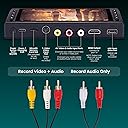
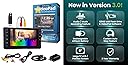
The ClearClick Video2Digital Converter 3.0 (Third Generation) is a compact, user-friendly device that converts analog video and audio sourcesโincluding VHS, camcorders, cassette tapes, and vinyl recordsโinto digital MP4 or WAV/MP3 files. Featuring a 5" preview screen, built-in rechargeable battery, USB-C charging, and a 128GB USB drive included, it requires no computer or software to operate. The bundle edition also offers VideoPad editing software and a 2-year warranty with USA-based support, making it the ultimate all-in-one solution for digitizing and preserving your cherished media collections.


| ASIN | B0BGJPRKR1 |
| Best Sellers Rank | 125,000 in Electronics & Photo ( See Top 100 in Electronics & Photo ) 966 in Video Converters |
| Brand Name | ClearClick |
| Colour | Black |
| Compatible Devices | Laptop, MP3 Player, Tablet, Television |
| Connector Type | Auxiliary, RCA |
| Customer Reviews | 4.6 4.6 out of 5 stars (458) |
| Input Voltage | 5 Volts |
| Item Dimensions | 15.7 x 8.9 x 2.5 centimetres |
| Item Weight | 8 Ounces |
| Manufacturer | ClearClick |
| Manufacturer Part Number | Video2Digital 3.0 Bundle Edition |
| Model Number | Video2Digital 3.0 Bundle Edition |
| Number of Items | 1 |
| Number of Ports | 4 |
| Package Quantity | 1 |
| Power Plug Type | Type C |
| Product Finish Type | Matte |
| Specific Uses For Product | Recording and digitizing video and audio from various sources |
| UPC | 850012969419 |
| Unit Count | 1.0 count |
| Warranty Type | Limited |
P**S
Conversion Simplicity
This was an easy to use, compact solution for video to digital conversion. I used it with several different cameras and it produced quality output with very good results. The output goes onto a memory card and can be distributed or modified further from there. I would definitely purchase again and have had friends ask if they could "borrow" it.
A**R
Nice device
Easy to use user friendly
E**Y
Saving Memories Made Easy
Let me start by saying I'm thrilled with the Video2Digital Converter 3.0! I've been wanting to digitize a box full of old VHS tapes for ages, and this little gadget made the process painless. Setup was a breeze. No wrestling with complicated instructions โ I had it hooked up to my VCR in minutes. The included cables were a huge plus, and the device itself felt very sturdy. What really impressed me was the ease of use. It's literally a two-button operation โ pop in a microSD card (not included, but that's a minor detail), connect your device, and hit record. The 5-inch screen is a fantastic addition โ I could preview the recordings directly on the converter, which saved me a lot of time compared to transferring blind. The video quality is great for home movies. My digitized tapes look exactly as I remember them, and the audio is clear too. It's not fancy professional quality, but that's not what I needed. For anyone looking for a simple and effective way to convert old home videos to digital, I can't recommend the Video2Digital Converter 3.0 enough. It's a lifesaver for anyone with a box of VHS tapes gathering dust in the attic! The rechargeable battery was also a great selling point for me.
A**L
easy to use and good size screen
Excellent product and easy to use
S**H
Works great for 8mm camcorder videos. cassettes.
I transferred 11 (22 hrs worth) precious 8mm videos to digital files with no failures right out of the box. The instructions were a bit disjointed but once I figured out a simple thing I was inadvertently doing wrong it was smooth sailing. VERY easy to use and I'm glad I got one with a big display. You can set to automatically record for a set period of time and just walk away while it continues to record or, monitor it while choosing to edit what parts of the film you want to record or omit (like old girlfriends pre-marriage) I was really nervous about doing this as my videos were 25+ years old and priceless to us but after a single test run, my fears were calmed. Its not glitchy and my fears quickly went away. Note that it does NOT play your physical videotape for you. I my case I played the tapes in my Sony 8mm Handicam and it is connected to the converter with a typical AV RCA cable. The quality of the video is just as good as the original. Once you have copied the footage on a flash drive you can access the videos simply by popping the flash drive to an available USB input on your smart TV. In my case the format didn't fit my TV screen exactly but the picture was very large and the entire frame fit the TV without going off of the screen. Note that the recording process requires the videos play to full length while creating the movie so there's nothing quick about it. This purchase was everything I was hoping for and more. I've not yet tried the included video editing software. I highly recommend this product!!
A**R
Would recommend it to others
Works 100% as advertised
P**R
Works great !
Works great does everything it is supposed to do very happy so far I ordered this bundle package as I wanted a bigger screen and the memory stick. I also read all reviews and videos prior to receiving this and even contacted their customer support before I even had the unit and they were very responsive and answered all my questions. It really is just plug-in play. I have not downloaded and used the editing software yet, but here are my first impressions. I wanted to use this primarily to transfer digital Hi8 tapes from my Sony TVR 315 camcorder. It did this quite well and picture was great. I did not have any issues with jerky video, so there was no need to use an S video cable. Then I started to transfer old VCR tapes with a Sony VCR. This worked just as well what I can say is that if the quality of the video going in is good. It will be good going out. Example: only on one or two VCR tapes had jerky video here and there. when played them on a TV directly I had the same issue. All I did was use a VCR head cleaner tape and this corrected about 75% of the issue again this was not any fault of the unit itself, and I did not have an S video out connection on the back of my VCR I did try to use the HDMI out of the unit while transferring tapes but this did not work while converting. It seems to work only on playback mode not a big deal for me. The speaker in the rear of the unit is quite low depending on your environment. This may be an issue, but not for me. The battery only last about 55 minutes. So I kept it, plugged in via the included power supply The way I use this was to use the OK button to pause transfer of the video, but still retain the same file. You will find that files will get quite large if it is a 60 minute tape this is not a problem for the unit, but would recommend breaking up into 5 to 10 minute files. Then I would completely power down the unit remove the USB stick and transfer to my laptop. You can easily make a full 30 minute file. It will just take longer to transfer from the USB drive to your laptop or computer. The key here is to label or make a descriptive file name once you transfer it to your hard drive as this device does not put them in a specific order on the USB drive, so name the file once itโs on your laptop then continue transferring. I consider this raw footage, and at some point I will play with the software to have a finished product with edits but for now it is doing exactly what it should do very well. I highly recommend this I have transferred at this .10 to 15 hours of video from both types of media, I will update this once I get to the software downloaded
Trustpilot
1 month ago
1 month ago