Desertcart purchases this item on your behalf and handles shipping, customs, and support to Norway.
🎧 Elevate your sound game with MOTU M2 — pro audio, zero compromise.
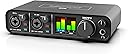
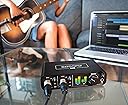
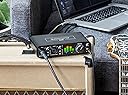
The MOTU M2 is a compact, USB-C powered 2-in/2-out audio interface featuring ultra-low 2.5 ms latency, a full-colour LCD metering display, and rugged metal construction. Compatible across Windows, macOS, Linux, and iOS without drivers, it offers professional-grade ESS Sabre32 Ultra DAC technology with 120 dB dynamic range, making it an ideal choice for home studios and mobile producers seeking high-quality, portable audio performance.


| ASIN | B0812B26TN |
| Audio Input | RCA, USB, XLR |
| Best Sellers Rank | 12,349 in Musical Instruments & DJ ( See Top 100 in Musical Instruments & DJ ) 57 in Computer Audio Interfaces |
| Brand | MOTU |
| Brand Name | MOTU |
| Compatible Devices | Tablet |
| Compatible devices | Tablet |
| Connectivity Technology | USB |
| Connectivity technology | USB |
| Customer Reviews | 4.6 out of 5 stars 1,519 Reviews |
| Frequency Response | 192 KHz |
| Frequency response | 192 KHz |
| Item Dimensions D x W x H | 19.1D x 10.8W x 4.4H centimetres |
| Item Type Name | Audio Interface |
| Item Weight | 612 Grams |
| Manufacturer | MOTU |
| Manufacturer Part Number | 3120 |
| Maximum Sample Rate | 192 KHz |
| Model Number | M2 |
| Number of Channels | 2 |
| Number of Items | 1 |
| Number of Packs | 1 |
| Number of channels | 2 |
| Operating System | Linux, Windows, macOS |
| Product Warranty | 2 years. |
| Supported Software | MOTU Drivers |
| Supported software | MOTU Drivers |
| UPC | 839128006119 |
| Unit Count | 1.0 count |
T**S
Easy to use, great price, quality sound
MOTU are a great company and this is perfect for recording at home
S**P
looks beautiful, works out of the box on linux!!!
great
G**K
Quality
Perfect for home studio
A**R
Really excellent
This is a really excellent audio interface, good volume gain and a detailed clear sound, just plug and play, my fl studio DAW recognised it straight away.
M**M
Sound quality
Simply excellent sound quality and ultra low latency.
A**U
Brilliant tech. Love it.
Great interface. I'm still using it and been using it daily! I wish it had a on/off button/switch somewhere for the microphone but not a deal breaker. I've purchased a SubZero Booster Preamp and that needs the 48V turned on. I do just use that 48V switch to 'mute' the microphone.
P**C
Great visual to have Input and Output Monitors.
New to Audio I chose this based on recommendations and fact it has Graphic Screen Visuals of Input and Output on the front face. Highly satisfied .. solidly built and looks and sounds great.Great
U**T
Great audio interface, terrible driver support. Do your research...
The MOTU M2, at its price point, ticks all the boxes for me. Quiet mic preamps, separate phantom power controls per channel, midi ports, both unbalanced & balanced monitor/loudspeaker outputs, great build quality, clear display, on/off switch, USB C and unlike other audio interface manufacturers, you don't need to create an account to access the drivers (I'm looking at you Universal Audio - shameful). The sound quality is excellent, by that I mean the mic pres are quiet until driven really hard which is expected at this price, and the interface can comfortably drive high impedance headphones. From a hardware point of view, this is a fantastic interface at a great price. But all of the above is let down by the, frankly, appalling Windows drivers. I don't know what the experience is like on the Macintosh side and I don't use desktop Linux either, but I've tried the M2 on Windows 10 and 11 and have observed the same behaviour: Unreliable and unstable audio caused (as far as I have discovered) by dreadful Windows drivers. I knew there were problems a few years ago, but was under the impression that these issues have all been patched and resolved. Indeed, I was encouraged to see up-to-date drivers and a new firmware available to install after I had unboxed the M2, however it looks like no progress has been made on the issues I have been reading about from years ago. One example: The interface is working perfectly, I have a dynamic mic attached to channel 1, headphones plugged in at the front and (powered off) bookshelf speakers connected via unbalanced RCA at the rear. I suddenly decide to remove the headphones and switch on the speakers (unreasonable, I know) and the entire audio stops working. Nothing gets recorded, nothing gets played. This isn't an isolated power surge or anything like that, I can recreate it time and time again using different speakers and even a different desktop computer. A similar situation happened with the microphones. I had 2 mics connected - 1 via an outboard mic pre (DBX 286) that was switched off but connected, the other a dynamic mic connected and in use. When I powered on the external preamp, all the audio stops, Audacity crashes and I'm forced to power off/power on the M2 to resolve it. There is a lengthy and extremely useful guide on the MOTU website about troubleshooting the M2 audio issues, but I have followed all of the steps in order and to the letter, but with no real improvement to speak of. It seems the drivers can't reliably handle a change in inputs whilst the unit is powered on. This is insane... The drivers are unacceptably poor and I'm thinking of simply returning the M2 for a refund. I don't believe what I'm doing (changing inputs & outputs on the fly) is an unreasonable use case and as a comparison, the Focusrite 2i4 2nd gen which I upgraded from does not do this at all, using the same set of equipment and the same tests. So to conclude, the MOTU M2 is an excellent audio interface offering a lot of compelling features for the price, yet hindered in a big way by poor software support. The LCD meter on the front is neither here nor there and almost completely useless - it looks a lot like a gimmick to me. Without a useful scale to accompany it, how do I know what I'm peaking at? What is this panel telling me? Yes, I can see where I start to clip - but what does that mean? 0db? +6? +16? Totally meaningless, albeit colourful, graphics designed to attract the easily amused. I would still have bought this unit even without the LCD screen as it had all the features I needed. I understand that the M2 "just works" over on MacOS, but if you are a Windows user like I am then you would be well advised to do some research and get some anecdotal information before making a purchase. If the M2 was backed up by solid driver support I would have no hesitation in recommending it, but for a device that is several years old the state of the drivers (or firmware, or both) is really quite appalling. EDIT 21/02/2023 - For anybody wondering, the MOTU M2 works perfectly with FreeBSD 13.0 & 13.1 It simply worked out of the box without any tinkering & with crystal clear sound as expected. I would assume Linux & MacOS behave the same way, which is why I stand by my initial review lambasting the terrible Windows drivers. EDIT 24/05/2023 - The MOTU M2 was demoted to my secondary audio interface and I reverted back to the Focusrite 2i4 2nd gen on my main desktop PC. Along with the sound cutting out when the inputs or outputs changed, I also noticed that sound would drop out (and stay gone) whilst gaming. I'm starting to think the inclusion of an on/off switch was to quickly work around the various issues with the interface. In all cases, a power cycle of the unit resolved the problem - but this is a solution to a problem which shouldn't exist in the first place. So my M2 now sits permanently attached to my work-provided Win 10 Enterprise laptop so I can use decent microphones for my multiple daily meetings. Is a £200 audio interface overkill for Teams & Zoom? Definitely. Should I have returned the M2 when I had the opportunity? 100% yes. Do I hate the unit? No, as the hardware is excellent, but I'm starting to feel that Windows users were a secondary thought & MOTU targeted MacOS users (who don't seem to have any M2 issues at all) as their primary audience. The Windows drivers are unacceptably poor and I have no further desire to try and make the M2 work properly. An audio interface should be plugged in and then largely fotgotten about, not be a constant source of problems. My time with MOTU devices is now done and I won't be buying one again.
P**L
Great value, great sound.
Fantastic piece of equipment, works flawlessly with Ableton Live 12 Standard and Aaki MPC Key37.
T**O
Not possible to register the device, no support.
The interface is not damaged or scratched which is good. The original packaging was not complete, nor the manual or original cables. The serial number is already registered so it is impossible to get support from Motu as registering a product is mandatory before tickets or contact is possible. So basicly just the interface, nothing else.
J**N
Awesome underrated product at a very good price
Very good and authentic product that i cannot find in Singapore for a good prrice
A**N
جميل جدا سعره مرتفع شوي
Good mic جميل وتراقب مستوى الصوت والمايك بالشاشه
C**.
Bella scheda ma...
La scheda è arrivata con i consueti tempi Prime: quindi velocissimi. Perfettamente imballata ed in confezione sigillata. Nella scatola la scheda ed un cavetto USB C. Installazione. Io uso una macchina Windows 7, quindi riporto la mia esperienza con questo sistema operativo. Ho scaricato i drivers, collegato ed installata la scheda come da istruzioni sulla unica USB 3 del mio computer. Il driver MOTU carica una finestrella che consente di regolare il campionamento. Trovato il punto dove la scheda funziona bene, ho iniziato la prova audio. Qui un primo problema. Dopo un po'di ho cercato di spostare la scheda su una USB 2. Ma nulla da fare: il computer da un errore di IRQ, ed anche disinstallando e rei9nstallando il problema permane. L'unico modo per far funzionare la motu (nel mio setup) é tenerla collegata alla USB 3. Ascolto ed uso. La scheda é stata connessa al mio impianto master. Il rapporto S/N é decisamente professionale e corrisponde alle aspettative di chi compra questo tipo di scheda: il rumore é inesistente! Il suono é bello é pulito. Gli ingressi microfoni ci sono in linea con le caratteristiche di uscita: non introducono rumore. Comodissima la possibilitá (che hanno ben poche schede) di accendere l'alimentazione phantom separatamente per ogni canale. Nessun problema quindi ad usare microfoni alimentati insieme a microfoni sbilanciati. Gli ingressi linea sono 2 (MOTU 2). Non sono presenti un tastino Hi-z o un ingresso dedicato per strumenti ad altissima impedenza. Ancora sul frontale i potenziometri di guadagno dei canali, il master, il comodissimo vu-meter a colori, l'ingresso cuffia ed il suo volume. Il suono della cuffia é ottimo ed ha un buon volume. Posteriormente ci sono 2 uscite bilanciate, 2 comodissime uscite RCA sbilanciare se avete un finale stereo o un impiantino con ingressi RCA, e le 2 prese DIN midi oltre alla USB C da connettere al computer. L'uso é facile, i potenziometri hanno una bella rotazione ed il case é di metallo. Insomma, la Motu ha quel non so che di solido analogico che non ti lascia mai a piedi che ne rende l'uso piacevolissimo. Le info del display modernissimo sono preziose, e la dotazione posteriore é completa. Sono super soddisfatto. Peccato solo per la faccenda della porta che non riesco a cambiare, ma potrebbe essere un problema del mio computer. In sintesi: un ottimo prodotto.
Trustpilot
2 months ago
4 days ago